Razer Kiyo Webcam Review


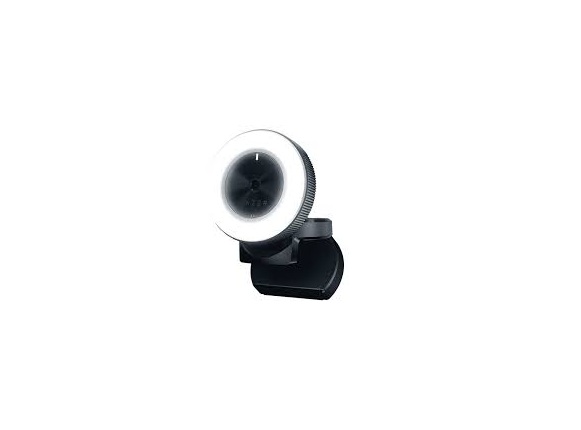
The Razer Kiyo is an older webcam with one clever feature that still makes it interesting: a built-in adjustable ring light surrounding the lens.
Rather than trying to compete with today’s 4K webcams on resolution, the Kiyo takes a different approach—give you decent 1080p video and make sure your face is properly illuminated. It remains listed by Razer and is still supported as of 2026. (Razer)
⭐ Overall rating: 7.5/10
Best for: Beginners, streamers, video calls, remote workers, and anyone who doesn’t already have a good light.
Not ideal for: Professional creators, 4K video, high-frame-rate 1080p streaming, or people who already own dedicated lighting.
📷 What you’re getting
The Kiyo provides:
- 1080p at 30 FPS
- 720p at 60 FPS
- Autofocus
- 81.6° diagonal field of view
- Built-in omnidirectional microphone
- 12-step adjustable ring light
- 5600K daylight-balanced lighting
- USB 2.0
- Tripod mount
- 170g weight
Razer’s specifications confirm that the camera uses a 4MP sensor and can also capture 2688 × 1520 still images.
The most important specification, however, is the ring light.
💡 The ring light is the reason to buy it


This is what made the Kiyo stand out when it launched—and it’s still genuinely useful.
The ring contains 12 white LEDs and uses a 5600K daylight color temperature. You control brightness simply by rotating the outer ring.
That’s wonderfully simple.
No:
- Separate key light
- Light stand
- Extra power cable
- Software controls
- Complicated setup
Just rotate the ring.
Tom’s Guide found that the light significantly improved the subject in dim conditions, although they also found the maximum setting uncomfortably bright. (Tom’s Guide)
Ring light: ⭐⭐⭐⭐⭐
It’s easily the Kiyo’s killer feature.
🎥 Video quality
The Kiyo produces good—not exceptional—1080p video.
In a reasonably well-lit room, the image is sharp enough for:
- Zoom
- Teams
- Discord
- Twitch
- YouTube
- Skype
- General video calls
Reviews have generally found the image to be punchy with good contrast when lighting is adequate. (Windows Central)
The autofocus is also one of the Kiyo’s strengths. Its 81.6° field of view is wide enough to accommodate two people reasonably comfortably. (Tom’s Guide)
Video quality: ⭐⭐⭐⭐
But there’s a significant limitation.
1080p/30 is now pretty ordinary.
Modern webcams increasingly offer 1440p, 4K, and/or 1080p at 60 FPS. The Kiyo is limited to 1080p/30 or 720p/60. (Razer)
So while the Kiyo’s image still looks good, its specifications are showing their age.
🌙 Low-light performance
This is an interesting one.
The Kiyo doesn’t have some magical low-light sensor. When the room gets dark, image quality still deteriorates and noise becomes visible.
But the built-in light makes a huge practical difference.
Instead of trying to make the camera see in darkness, you’re putting light directly onto your face.
That’s actually the smarter solution.


The result is particularly useful for:
Late-night streaming: ⭐⭐⭐⭐⭐
Dark bedrooms: ⭐⭐⭐⭐
Home offices: ⭐⭐⭐⭐⭐
Poorly lit rooms: ⭐⭐⭐⭐
The important distinction is that the Kiyo’s lighting performance is better than its underlying low-light camera performance.
🎙️ The microphone is disappointing
This is probably my biggest complaint.
The Kiyo includes an omnidirectional microphone, but it’s not something I’d recommend for serious streaming.
Multiple reviews have criticized the microphone quality, with Tom’s Guide specifically describing the audio as subpar. (Tom’s Guide)
For:
- Zoom
- Discord
- Casual meetings
it’s usable.
For:
- Twitch
- YouTube
- Podcasts
- Professional presentations
I’d use a headset or dedicated USB microphone.
Microphone: ⭐⭐⭐
Fortunately, this isn’t much of a problem for its target audience. Most serious streamers already use a dedicated microphone.
🔧 Design and mounting
The Kiyo has a clever folding design that makes it easy to put on a laptop or monitor.
It can also sit on a desk or attach to a tripod using the standard 1/4″-20 thread.
At 170g, it’s reasonably lightweight.
The design is also much more distinctive than the typical rectangular webcam.
Design: ⭐⭐⭐⭐⭐
I actually think the circular design has aged well.
🖥️ Software and compatibility
One of the nice things about the Kiyo is that it’s basically plug and play.
You can use it with common applications such as OBS and video conferencing software. (Windows Central)
Razer also provides image-quality customization, while the ring light itself can be adjusted physically.
You don’t need to spend an hour configuring it just to make a video call.
⚠️ The biggest problem in 2026
The Kiyo’s biggest weakness isn’t that it produces bad video.
It doesn’t.
The problem is what else you can buy today.
Razer’s current lineup includes the Kiyo V2, which offers 4K/30, 1080p/60, HDR and a 93° field of view, while the Kiyo V2 Pro goes as high as 4K/60. (Tom’s Hardware)
Razer currently lists the Kiyo V2 at $149.99 and the Kiyo V2 Pro at $299.99. (Razer)
So the original Kiyo needs to be considerably cheaper to make sense.
🆚 Razer Kiyo vs. modern webcams
| Feature | Razer Kiyo | Modern 1080p webcam | Kiyo V2 |
|---|---|---|---|
| Resolution | 1080p | 1080p/1440p | 4K |
| 1080p/60 | ❌ | Usually | ✅ |
| Autofocus | ✅ | Usually | ✅ |
| Built-in light | ✅ | Rare | ❌ |
| HDR | ❌ | Sometimes | ✅ |
| Microphone | ⭐⭐⭐ | ⭐⭐⭐ | ⭐⭐⭐ |
| Portability | ⭐⭐⭐⭐⭐ | ⭐⭐⭐⭐ | ⭐⭐⭐⭐ |
| Ease of use | ⭐⭐⭐⭐⭐ | ⭐⭐⭐⭐⭐ | ⭐⭐⭐⭐ |
| Streaming | ⭐⭐⭐⭐ | ⭐⭐⭐⭐ | ⭐⭐⭐⭐⭐ |
👍 What I like
1. The integrated lighting
Still the Kiyo’s biggest selling point.
2. Excellent autofocus
It keeps you sharp without requiring constant manual adjustment. (Tom’s Guide)
3. Simple setup
Plug it in and start using it.
4. Compact design
Great for small desks and laptops.
5. Good 1080p image
It’s still perfectly adequate for most video calls and beginner streaming.
👎 What I don’t like
1. 1080p/30 is showing its age
This is the biggest technical limitation.
2. Microphone quality
You’ll want a separate mic for serious content.
3. Ring light can be too bright
At maximum brightness it can be uncomfortable and produce an overly harsh look. (Tom’s Guide)
4. Low-light image still gets noisy
The ring light helps, but it isn’t a substitute for a good camera sensor.
5. No 1080p/60
720p/60 is available, but I’d rather have Full HD at 60 FPS.
🏆 Final verdict
Razer Kiyo — 7.5/10
Image quality: 8/10
Autofocus: 9/10
Ring light: 10/10
Microphone: 6/10
Design: 9/10
Ease of use: 10/10
Streaming: 8/10
Video calls: 9/10
Value in 2026: 7/10
The bottom line
The Razer Kiyo is a good webcam that has one genuinely great idea: put a proper light directly around the camera.
And that still works.
If you find the Kiyo at a deep discount, I’d happily recommend it to someone who needs a simple webcam and doesn’t have good lighting. But I wouldn’t pay close to its original $99 price in 2026 when newer webcams offer substantially better resolution and frame rates. Tom’s Guide likewise notes that competing webcams now offer 2K/30 or 1080p/60 at comparable or lower prices. (Tom’s Guide)
My sweet spot: If you can find the original Kiyo for around $40–$60, it’s a very good buy. Above roughly $70–$80, I’d start looking at newer 1080p/1440p webcams instead.
If you’re specifically a streamer, the Kiyo’s built-in light makes it much more appealing than its raw camera specifications suggest.