Corsair SCIMITAR ELITE Wireless Review


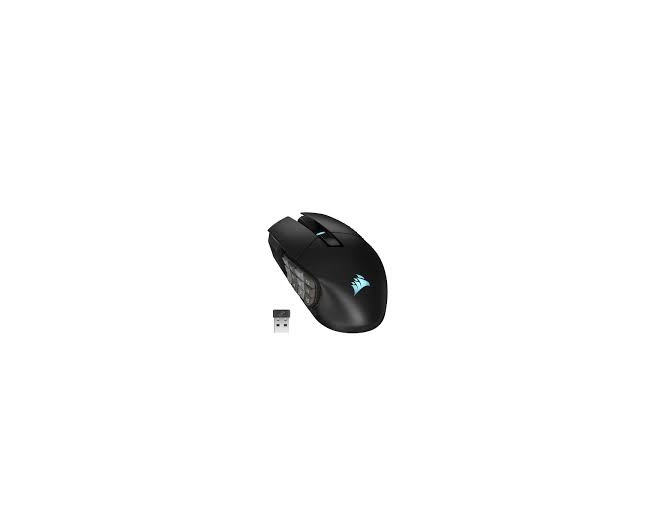
If you’re talking about the CORSAIR SCIMITAR ELITE Wireless MMO Gaming Mouse, this is a mouse built around one idea: put an entire shortcut keypad under your thumb.
With 16 programmable buttons, a movable 12-button side panel, optical switches, Corsair’s MARKSMAN 26K sensor, Slipstream wireless, Bluetooth, and USB connectivity, it’s an unusually capable mouse for MMOs and productivity. CORSAIR currently lists the standard model at $129.99. (CORSAIR)
⭐ Overall rating: 9/10
Best for: MMO players, RPG gamers, productivity power users, video editors, streamers, and anyone who needs lots of shortcuts.
Not ideal for: Competitive FPS players, people who prefer lightweight mice, or anyone who doesn’t need a dozen thumb buttons.
🎮 The star of the show: 16 programmable buttons
The SCIMITAR’s defining feature is its 12-button thumb keypad.


The entire keypad can physically slide forward and backward, allowing you to position the buttons where your thumb naturally rests. CORSAIR calls this the Key Slider system. (CORSAIR)
That is much more useful than it sounds.
For example, in World of Warcraft, you could assign:
- 1–4 → primary abilities
- 5–8 → defensive abilities
- 9–12 → cooldowns
- Extra mouse buttons → targeting, mounts, interrupts and utility
Suddenly, you’re moving your character with the keyboard while having a huge number of abilities available without moving your hand.
And it isn’t limited to gaming.
You could use the buttons for:
Photoshop
- Undo
- Redo
- Brush size
- Zoom
- Pan
- Copy/paste
Video editing
- Play/pause
- Cut
- Ripple delete
- Timeline navigation
- Zoom
Office/productivity
- Copy
- Paste
- Save
- Browser tabs
- Screenshot
- Window switching
This is where the SCIMITAR becomes more than an MMO mouse.
🖱️ Ergonomics
The SCIMITAR Elite is a large, right-handed mouse.
It’s not designed to disappear beneath your hand like an ultralight esports mouse. Instead, your palm sits relatively high and your thumb rests naturally against the keypad.
CORSAIR specifically designed the shape around extended gaming sessions. (CORSAIR)
Comfort: ⭐⭐⭐⭐⭐
For larger hands and palm/claw grips, it’s excellent.
The downside is that the mouse is relatively heavy at about 114g. Tom’s Hardware measured it at 4.02 oz/114g. (Tom’s Hardware)
That’s perfectly reasonable for an MMO mouse, but it’s considerably heavier than modern competitive FPS mice.
So:
MMO: 👍
RPG: 👍
Strategy: 👍
Productivity: 👍
Competitive FPS: 👎
🎯 Sensor performance
The standard SCIMITAR Elite Wireless uses CORSAIR’s MARKSMAN 26K optical sensor, with sensitivity up to 26,000 DPI. (CORSAIR)
It supports:
- Up to 26,000 DPI
- 650 IPS
- 50G acceleration
- 1,000Hz polling
- Adjustable DPI
You absolutely don’t need 26,000 DPI.
Most people will be perfectly happy around 800–3,200 DPI.
The important thing is that the sensor tracks accurately and consistently.
Sensor rating: ⭐⭐⭐⭐⭐
For an MMO mouse, it’s excellent.
⚡ Optical switches
The primary buttons use optical switches rather than conventional mechanical switches.
CORSAIR rates them for up to 100 million clicks. (CORSAIR)
The buttons have a relatively crisp, tactile feel without being excessively heavy.
This is especially useful for MMOs where you’re potentially clicking constantly for hours.
Button feel: ⭐⭐⭐⭐⭐
One caveat: the side buttons are obviously much smaller and closer together than normal mouse buttons. It takes a little practice to develop muscle memory.
📡 Wireless performance
This is another area where the SCIMITAR Elite performs very well.
You get three connection options:
2.4GHz Slipstream wireless
Bluetooth
USB wired
CORSAIR specifies sub-1ms Slipstream wireless and 1,000Hz polling for the current standard model. (CORSAIR)
Tom’s Hardware found the wireless connection stable during testing with no noticeable drops or latency problems. (Tom’s Hardware)
That’s exactly what you want from a wireless gaming mouse.
Wireless rating: ⭐⭐⭐⭐⭐
I would use 2.4GHz Slipstream for gaming and Bluetooth when maximum battery efficiency or convenience matters more.
🔋 Battery life
Battery life is good, although it isn’t the absolute best among modern wireless mice.
CORSAIR currently specifies up to 150 hours over Bluetooth with RGB off for the standard model. (CORSAIR)
RGB and wireless mode affect endurance, naturally.
The good thing is that you can simply plug in USB-C and continue playing.
Battery rating: ⭐⭐⭐⭐½
For an MMO mouse with this many buttons and lighting, it’s quite respectable.
🌈 RGB and iCUE
Naturally, this is a CORSAIR product, so you get iCUE.
The SCIMITAR has two RGB lighting zones and allows you to customize lighting, button assignments, macros, DPI, profiles and other settings through iCUE. (CORSAIR)


The software is extremely powerful.
But there’s a catch.
iCUE can be overkill.
If you just want a mouse that works, iCUE is more complicated than necessary.
If you love customization, however, it’s a major advantage.
You can create different profiles for different games and applications, and the mouse has onboard profile storage for up to three custom profiles. (CORSAIR)
🧙 MMO gaming
This is where the SCIMITAR Elite absolutely earns its name.
For games such as:
- World of Warcraft
- Final Fantasy XIV
- Guild Wars 2
- Elder Scrolls Online
- Diablo IV
- Path of Exile
- Lost Ark
the extra buttons can be transformative.
Instead of memorizing dozens of keyboard combinations, you can assign abilities directly to your thumb.
MMO rating: ⭐⭐⭐⭐⭐
If you’re a serious MMO player, this is one of the mouse’s strongest reasons to exist.
🔫 FPS gaming
Here’s where things change.
I wouldn’t recommend the SCIMITAR Elite for competitive FPS gaming.
The reason isn’t performance. The sensor and wireless connection are perfectly capable.
It’s the weight and physical design.
At around 114g, it is simply much heavier than the lightweight mice favored by competitive FPS players. (Tom’s Hardware)
The 12-button keypad also doesn’t provide much benefit in a game where you primarily need:
- Aim
- Fire
- Reload
- Weapon switching
- Movement
For games such as Counter-Strike or Valorant, I’d choose a much lighter mouse.
FPS rating: ⭐⭐⭐
It works, but it’s not what this mouse was designed for.
💼 Productivity powerhouse
This is perhaps the most underrated aspect of the SCIMITAR.
Once you start assigning shortcuts, the mouse becomes almost like a mini Stream Deck attached to your hand.
For example:
| Button | Function |
|---|---|
| 1 | Copy |
| 2 | Paste |
| 3 | Undo |
| 4 | Redo |
| 5 | Save |
| 6 | Screenshot |
| 7 | New tab |
| 8 | Close tab |
| 9 | Previous tab |
| 10 | Next tab |
| 11 | Play/Pause |
| 12 | Mute |
You can then have separate profiles for different programs.
For someone who spends hours a day working on a PC, that can genuinely save time.
Productivity rating: ⭐⭐⭐⭐⭐
⚠️ The biggest problem: button overload
There is definitely a learning curve.
At first, you’ll probably hit the wrong button.
The 12 side buttons are packed relatively tightly together, so you need to develop thumb muscle memory.
That’s not a flaw unique to Corsair—it’s inherent to this type of mouse.
After a few weeks, however, the buttons become much easier to distinguish.
🆚 SCIMITAR Elite vs. conventional gaming mouse
| Feature | SCIMITAR Elite Wireless | Normal gaming mouse |
|---|---|---|
| Programmable buttons | ⭐⭐⭐⭐⭐ | ⭐⭐ |
| MMO gaming | ⭐⭐⭐⭐⭐ | ⭐⭐ |
| FPS | ⭐⭐⭐ | ⭐⭐⭐⭐⭐ |
| Productivity | ⭐⭐⭐⭐⭐ | ⭐⭐⭐ |
| Weight | ⭐⭐⭐ | ⭐⭐⭐⭐ |
| Ergonomics | ⭐⭐⭐⭐⭐ | ⭐⭐⭐⭐ |
| Wireless | ⭐⭐⭐⭐⭐ | ⭐⭐⭐⭐⭐ |
| Customization | ⭐⭐⭐⭐⭐ | ⭐⭐⭐⭐ |
| Learning curve | ⭐⭐⭐ | ⭐⭐⭐⭐⭐ |
🆕 What about the SCIMITAR Elite Wireless SE?
This is important if you’re shopping for one today.
CORSAIR now also sells the newer SCIMITAR ELITE WIRELESS SE, which upgrades the mouse to a MARKSMAN S 33K sensor, rated for 33,000 DPI, 750 IPS and 50G acceleration. CORSAIR also advertises up to 150 hours on 2.4GHz and up to 500 hours on Bluetooth with RGB off. (CORSAIR)
The SE currently lists around $139.99, only $10 more than the standard model on CORSAIR’s U.S. site. (CORSAIR)
That changes my buying recommendation.
If the prices are close, I’d buy the SE.
The standard SCIMITAR Elite remains an excellent mouse, but the newer SE offers better hardware for a relatively small premium.
🏆 Final verdict
CORSAIR SCIMITAR ELITE Wireless — 9/10
Build quality: 9/10
Ergonomics: 9/10
Buttons: 10/10
Sensor: 9/10
Wireless: 9.5/10
Battery: 9/10
Software: 8.5/10
MMO gaming: 10/10
FPS gaming: 7/10
Productivity: 10/10
Value: 9/10
👍 What I love
- 16 programmable buttons
- Adjustable 12-button side panel
- Excellent ergonomics
- Great optical switches
- Excellent sensor
- Reliable wireless
- Bluetooth + 2.4GHz + wired
- Excellent for MMOs
- Surprisingly useful for productivity
- Onboard profiles
- USB-C
👎 What I don’t love
- Heavy compared with modern ultralight mice
- Side buttons take time to learn
- iCUE can feel complicated
- Overkill if you only play FPS games
- Right-handed only
Bottom line
The SCIMITAR Elite Wireless is one of the best mice you can buy if you actually need lots of buttons.
It’s not trying to be the lightest or fastest mouse on your desk. Instead, it’s essentially a wireless gaming mouse + programmable keypad + productivity controller rolled into one.
And at the current $129.99 price, it’s still a strong option. (CORSAIR)
My recommendation in 2026: If you’re choosing between the standard SCIMITAR Elite Wireless and the newer SCIMITAR Elite Wireless SE, I’d spend the extra ~$10 for the SE. The newer 33K sensor and improved battery specifications make it the better long-term purchase. (CORSAIR)