

Razer Freyja HD Haptics Cushion Review
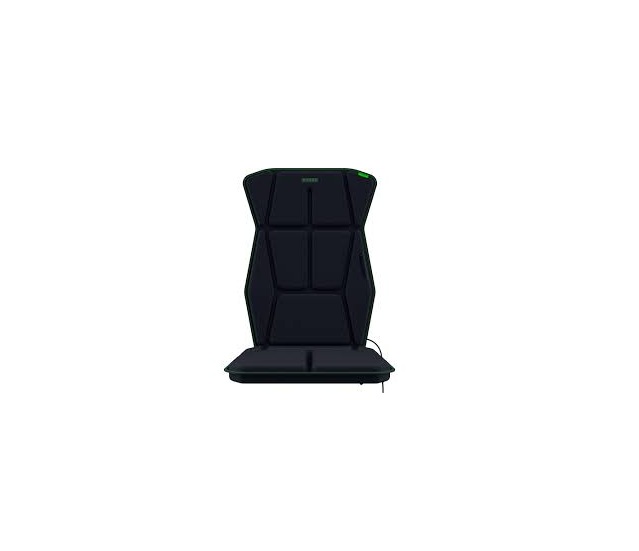
The Razer Freyja is one of those gaming accessories that sounds gimmicky until you actually experience it. Instead of simply hearing an explosion or feeling a controller rumble, the Freyja makes your chair vibrate around your back, hips, and legs, creating a surprisingly immersive sense of physical impact.
At $299.99, however, it’s definitely a luxury gaming accessory rather than something every gamer needs. (Tom’s Hardware)
⭐ Overall Rating: 8/10
What I like most: The haptics are genuinely impressive when a game supports them properly.
Biggest problem: The price, software dependency, and occasional reports of reliability/software issues make it difficult to recommend to everyone.
Design & Comfort — 8.5/10
The Freyja is essentially a padded haptic layer that straps onto your existing gaming chair, so you don’t need to purchase an entirely new chair. It uses six voice-coil actuators distributed across four haptic zones: upper body, lower body, left leg, and right leg.
That’s important because the sensation isn’t simply “the whole chair vibrates.”
A gunshot can hit your right side. An explosion can travel through your back and legs. A racing game’s engine can produce a continuous vibration underneath you.
It’s a much more localized sensation than a traditional rumble motor.
The recommended user range is approximately 5’3″–6’6″ and under 300 pounds, so it should accommodate most adults.
🎮 Haptic Performance — 9/10
This is where the Freyja earns its money.
Razer’s Sensa HD system can reproduce everything from subtle environmental effects to heavy explosions. Supported games can send specific haptic information to the cushion rather than simply converting every sound into vibration.
In a good game, the difference is surprisingly noticeable.
For example:
- 💥 Explosions → powerful impacts through your torso
- 🔫 Gunfire → sharp localized pulses
- 🏎️ Racing → engine/road feedback
- ⚔️ Melee combat → directional hits
- 🌧️ Environmental effects → subtle continuous sensations
- ❤️ Heartbeats → gentle rhythmic pulses
The result is less like “my chair is vibrating” and more like your body is receiving another layer of information from the game.
That’s particularly impressive in action games, racing games, horror games, and shooters.
Software — 7/10
The hardware is excellent, but software is the Freyja’s weak point.
On PC, you need Razer Synapse 4, and Razer says the Freyja only works with Synapse 4.
There are two main experiences:
Sensa HD Games
The best option. Supported games can provide more sophisticated, game-specific haptic feedback.
Audio-to-Haptics
This allows the Freyja to translate audio into vibrations, making it useful even when a game doesn’t have native Sensa support.
The second option is convenient, but it isn’t nearly as sophisticated. You can end up with the cushion responding to sounds that you don’t necessarily want converted into physical feedback.
There have also been reports from Razer users in 2026 of Synapse-related problems, including haptics intermittently failing or becoming excessively strong/weak after software updates. (Razer Insider)
That’s something I’d consider before spending $300.
Connectivity — 8/10
The Freyja supports 2.4 GHz wireless and Bluetooth, but there’s an important catch:
It isn’t battery powered.
It has to remain connected to an AC power source while you’re using it.
So although the communication with your PC can be wireless, you still have a power cable running to the chair.
That’s not a huge problem for a permanent gaming setup, but it makes moving the chair around less convenient.
🔊 One Unexpected Problem: Noise
This is probably the biggest downside that doesn’t immediately appear on the specification sheet.
The haptics can be audible, particularly at higher intensity. TechRadar specifically noted that the haptics were surprisingly loud during its hands-on testing. (TechRadar)
If you’re gaming late at night while someone else is sleeping nearby, that’s worth considering.
It’s not speaker-level loud, but you can hear the mechanical vibration.
Game Compatibility
The experience depends heavily on software support.
Razer originally launched the Freyja with a relatively limited number of native Sensa HD games, while additional games can work through platforms such as SimHub. (Tom’s Hardware)
That means the Freyja can be spectacular in the right game and merely an expensive vibrating cushion in another.
That’s probably the single biggest factor in whether you’ll love it.
Pros & Cons
| 👍 Pros | 👎 Cons |
|---|---|
| Excellent physical immersion | $299.99 is expensive |
| Six haptic actuators | Requires AC power |
| Four independently controlled zones | Requires Razer Synapse 4 on PC |
| Works with your existing chair | Game support varies |
| Excellent for racing/action/horror | Haptics can be audible |
| Audio-to-Haptics expands compatibility | Software issues have been reported |
| Wireless connectivity | Not particularly portable |
Is the Razer Freyja Worth $300?
For most gamers: No.
For an enthusiast gaming setup: Absolutely.
If you primarily play competitive games like Valorant, Counter-Strike, or League of Legends, I’d put the $300 toward a better monitor, GPU, headset, or other peripheral.
But if you play racing games, RPGs, horror games, cinematic single-player games, shooters, or flight/space sims, the Freyja makes considerably more sense.
It’s also particularly interesting if you already have a high-end gaming PC and have reached the point where you’re looking for immersion rather than more performance.
My Verdict
The Razer Freyja is not a gimmick. The underlying haptic technology is genuinely impressive, and when Sensa HD is properly implemented, it adds a dimension to gaming that conventional speakers and headphones simply can’t reproduce.
But it’s also a luxury accessory with a luxury price.
I’d give it 8/10:
Immersion: ⭐⭐⭐⭐⭐
Haptic quality: ⭐⭐⭐⭐⭐
Comfort: ⭐⭐⭐⭐½
Software: ⭐⭐⭐½
Compatibility: ⭐⭐⭐½
Value: ⭐⭐⭐
Overall: ⭐⭐⭐⭐
Bottom line: If you’re building a premium gaming setup and want to feel your games as well as see and hear them, the Freyja is one of the most interesting gaming accessories available. If you’re trying to maximize performance per dollar, however, $300 can buy you upgrades that will have a much bigger impact.
Razer Freyja support and specifications