UGREEN NASync DXP480T Plus Review


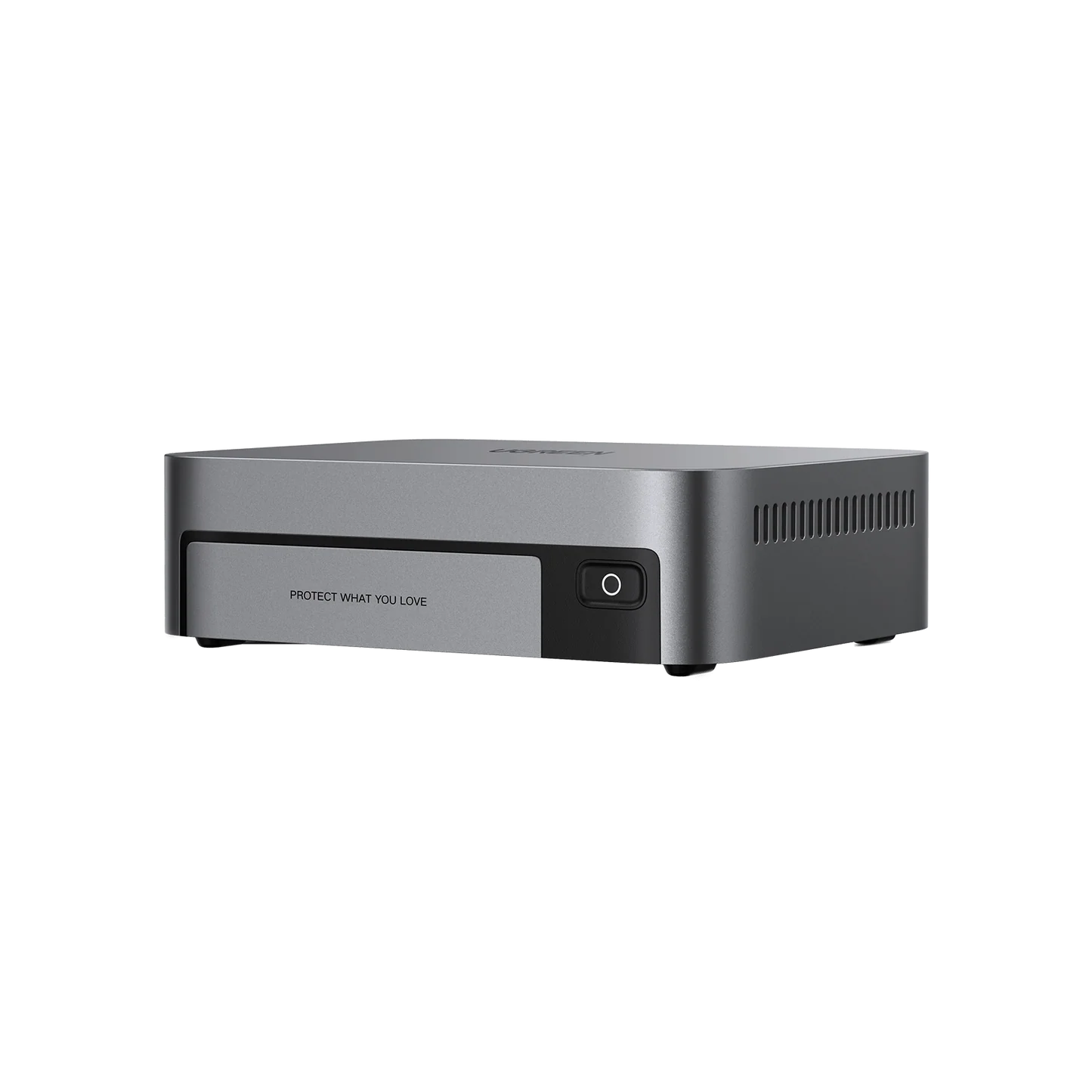
The UGREEN NASync DXP480T Plus is one of the more unusual NAS systems I’ve seen. Instead of using traditional 3.5-inch hard drives, it’s an all-flash NAS built around four M.2 NVMe SSDs. Add a 12th-generation Intel Core i5-1235U, 10Gb Ethernet, two Thunderbolt 4 ports and expandable DDR5 memory, and you’ve got something that is closer to a mini workstation/server than a conventional NAS.
It’s also expensive. UGREEN currently lists it around $849.99–$899.99 diskless, depending on the current promotion. (UGREEN AIoT US)
⭐ Overall rating: 8.8/10
Best for: Photographers, videographers, content creators, developers, home-lab enthusiasts and anyone who needs very fast network storage.
Not ideal for: People who simply want inexpensive bulk storage, beginners wanting the simplest NAS experience, or anyone who doesn’t have a 10GbE network.
🚀 The hardware is the star
The DXP480T Plus has an impressive specification sheet:
- Intel Core i5-1235U
- 10 cores / 12 threads
- 8GB DDR5 RAM
- RAM expandable to 64GB
- 4 × M.2 2280 NVMe slots
- Up to 32TB of internal NVMe storage according to UGREEN
- 10GbE
- Wi-Fi
- 2 × Thunderbolt 4
- USB 3.2 Gen 2
- HDMI output supporting up to 8K
- 128GB system SSD
- RAID 0/1/5/6/10/JBOD support
- UGOS Pro
That is a lot of hardware in a remarkably small enclosure.
Hardware rating: ⭐⭐⭐⭐⭐
📦 Four NVMe slots instead of hard-drive bays
This is the defining feature.
Traditional NAS:
Hard drives → lots of storage → relatively inexpensive → slower
DXP480T Plus:
NVMe SSDs → extremely fast → quiet → expensive
Each of the four M.2 slots accepts an NVMe drive. StorageReview tested the system with four Samsung 980 Pro SSDs in RAID 5 and found the platform capable of very high storage performance. (StorageReview.com)
This makes the DXP480T Plus particularly attractive for:
- 4K video editing
- Large photo libraries
- Music production
- Virtual machines
- Docker
- Databases
- Software development
- Large project files
It’s less compelling if your primary goal is simply storing movies and backups.
⚡ 10GbE is a game changer
The DXP480T Plus has a 10GbE RJ45 port, theoretically capable of up to about 1,250 MB/s of network bandwidth. UGREEN specifically advertises 10GbE as one of its headline features. (UGREEN AIoT US)
And this is where the NVMe drives make sense.
A normal gigabit NAS tops out around:
~110 MB/s
A 2.5GbE NAS:
~280 MB/s
10GbE:
~1,000–1,200 MB/s in favorable conditions
That’s a dramatic difference.
In real-world testing, Macworld measured approximately 741 MB/s read and 596 MB/s write using an M1 Max Mac Studio. (Macworld)
Network performance: ⭐⭐⭐⭐⭐
But there’s an important catch:
You need a 10GbE network to take advantage of it.
If your computer is connected through ordinary gigabit Ethernet, you’re throwing away most of the DXP480T’s performance.
🍎 Excellent match for Mac users
This is one of the places where I think the DXP480T Plus makes a lot of sense.
If you’re using a Mac Studio, MacBook Pro, Mac mini or another high-performance Mac with 10GbE, the DXP480T can effectively function as a very fast shared external storage system.
Macworld’s testing with an M1 Max Mac Studio produced the impressive 596/741 MB/s write/read results mentioned above. (Macworld)
For photographers and video editors, that’s extremely useful.
Imagine having:
Mac → 10GbE → DXP480T → NVMe RAID
Instead of keeping every project on your internal SSD.
🎬 Video editing
This may actually be the DXP480T Plus’s killer application.
If you’re working with:
- 4K video
- ProRes
- RAW photos
- Large Lightroom libraries
- Final Cut Pro
- DaVinci Resolve
- Premiere Pro
a fast NAS can dramatically improve your workflow.
You can keep your project files centrally stored while accessing them at hundreds of megabytes per second.
Video editing: ⭐⭐⭐⭐⭐
The caveat is that your entire network has to be fast enough.
A 10GbE NAS connected to a 1GbE switch isn’t going to suddenly make your Mac transfer files at 1GB/s.
🔌 Thunderbolt 4
The two Thunderbolt 4 ports are another unusual feature.
You can attach external high-speed storage and other Thunderbolt peripherals.
TechRadar specifically praised the inclusion of dual Thunderbolt 4 ports. (TechRadar)
However, there’s an important limitation:
Thunderbolt isn’t implemented as a normal direct-connect Thunderbolt NAS network interface.
TechRadar found the ports operate in host mode, meaning you can’t simply connect your Mac with a Thunderbolt cable and treat the DXP480T as a giant Thunderbolt NAS. (TechRadar)
That’s disappointing.
Thunderbolt: ⭐⭐⭐½
The hardware is excellent; the implementation could be more useful.
🧠 CPU performance
The Intel Core i5-1235U is significantly more powerful than the processors found in many conventional NAS systems.
It’s a:
10-core / 12-thread Alder Lake processor
with Intel Iris Xe graphics. (TechRadar)
That gives the DXP480T plenty of processing headroom.
You can run things such as:
- Docker containers
- Virtual machines
- Development environments
- Databases
- File services
- Background processing
without immediately overwhelming the CPU.
CPU: ⭐⭐⭐⭐⭐
This is one of the reasons the DXP480T feels more like a tiny server than a conventional NAS.
🧮 64GB RAM support
The standard system comes with 8GB DDR5, but the two SODIMM slots allow expansion to 64GB. (TechRadar)
That’s fantastic for a NAS.
8GB is perfectly adequate for basic file storage.
But if you’re planning on running:
- Docker
- Plex alternatives
- virtual machines
- databases
- development environments
I’d strongly consider 32GB or 64GB.
Upgradeability: ⭐⭐⭐⭐½
There’s one annoyance: accessing the RAM isn’t particularly convenient because some screws are hidden beneath the rubber feet. (TechRadar)
🤫 It’s remarkably quiet
One of the best things about an all-NVMe NAS is the lack of spinning hard drives.
Traditional NAS:
whirrrrrrrrrrrrrrr
DXP480T:
much quieter
TechRadar described it as fast and silent, and Macworld also praised its quiet operation. (TechRadar)
That’s particularly nice if the NAS sits:
- On your desk
- In a home office
- In a studio
- Next to your workstation
Noise: ⭐⭐⭐⭐⭐
📐 Tiny footprint
The DXP480T Plus measures approximately:
178 × 142 × 52 mm
That’s incredibly compact for the hardware inside. (TechRadar)


It’s much closer to the footprint of a mini PC than a traditional four-bay NAS.
Design: ⭐⭐⭐⭐⭐
💻 UGOS Pro
And here we arrive at the DXP480T’s biggest weakness.
The hardware is fantastic.
The software isn’t quite there yet.
UGREEN’s NAS operating system, UGOS Pro, has improved considerably since launch, but reviewers have consistently pointed out that the software ecosystem isn’t as mature as Synology’s DSM or QNAP’s QTS.
TechRadar specifically criticized UGOS’s feature set, while Macworld noted that applications were still relatively limited and that some features weren’t fully integrated. (TechRadar)
Software: ⭐⭐⭐½
This is the primary reason I wouldn’t automatically recommend the DXP480T over a Synology.
🐳 Docker saves the day
Fortunately, there’s an escape hatch.
The DXP480T supports Docker, which opens up a huge ecosystem of third-party applications.
You can potentially run:
- Jellyfin
- Home Assistant
- Immich
- Nextcloud
- Vaultwarden
- Pi-hole
- Git services
- Databases
- Web servers
- Development environments
That dramatically increases what the machine can do.
TechRadar specifically points out that users comfortable with Docker and virtualization can add functionality that UGOS itself lacks. (TechRadar)
Home-lab potential: ⭐⭐⭐⭐⭐
If you’re technically comfortable with Docker, I actually think this machine becomes much more attractive.
🎞️ Plex?
This is where I’d pause.
The DXP480T has plenty of CPU horsepower, but UGREEN’s native application ecosystem has historically lagged behind Synology/QNAP.
Macworld specifically criticized the lack of specialized media servers such as Plex and MinimServer at the time of testing. (Macworld)
You can potentially work around that using Docker, but that’s different from:
Click → Install Plex → Done
If you want a simple appliance, Synology remains more polished.
🔐 Backup and file storage
For basic NAS duties, the DXP480T works well.
You can create:
- Shared folders
- User accounts
- Permissions
- RAID arrays
- Backups
- Private-cloud storage
UGREEN’s integrated NAS app combines file, photo and music functionality rather than requiring a separate application for every function. (Macworld)
Backup/storage: ⭐⭐⭐⭐½
One thing I’d emphasize:
RAID is not backup.
If you put four SSDs into RAID 5, that protects against certain drive failures, but it doesn’t protect you against accidental deletion, ransomware, theft or catastrophic hardware failure.
You’ll still want an external/off-site backup.
📱 Mobile app
UGREEN’s NAS app provides access to:
- Files
- Photos
- Music
- Storage management
- Hardware information
Macworld found the interface clear and customizable, although some features had rough edges. (Macworld)
The software has improved since those early reviews, but this remains an area where Synology has the advantage.
Mobile experience: ⭐⭐⭐⭐
⚠️ The biggest hardware flaw: one Ethernet port
This is my biggest criticism.
A machine this powerful has:
one 10GbE port.
That’s it.
TechRadar specifically criticized the single LAN port. (TechRadar)
For a $900-ish NAS, I would have liked to see:
10GbE + 2.5GbE
or preferably:
2 × 10GbE
That would allow better redundancy, link aggregation and network flexibility.
Networking design: ⭐⭐⭐½
The 10GbE port itself is excellent.
Having only one is the problem.
💰 Price
This is the other major issue.
UGREEN currently lists the DXP480T Plus around $849.99–$899.99 without storage. (UGREEN AIoT US)
And then you need to buy four NVMe SSDs.
For example, a 4 × 4TB configuration means:
16TB raw storage
before RAID overhead.
And if you’re using RAID 5, you’ll have roughly the equivalent of 12TB before filesystem/formatting overhead.
That’s not cheap.
Value: ⭐⭐⭐½
The hardware is excellent.
But you’re paying a premium for it.
🆚 DXP480T Plus vs. conventional NAS
| Feature | DXP480T Plus | Traditional 4-bay NAS |
|---|---|---|
| Storage | 4 × NVMe | 4 × SATA |
| Speed | ⭐⭐⭐⭐⭐ | ⭐⭐⭐ |
| Noise | ⭐⭐⭐⭐⭐ | ⭐⭐ |
| Power efficiency | ⭐⭐⭐⭐ | ⭐⭐⭐ |
| Capacity/$ | ⭐⭐ | ⭐⭐⭐⭐⭐ |
| 10GbE | ✅ | Depends |
| Thunderbolt 4 | ✅ | Rare |
| CPU | ⭐⭐⭐⭐⭐ | Usually lower |
| Docker | ✅ | Depends |
| Media server ecosystem | ⭐⭐⭐ | ⭐⭐⭐⭐⭐ |
| Portability | ⭐⭐⭐⭐⭐ | ⭐⭐ |
| Video editing | ⭐⭐⭐⭐⭐ | ⭐⭐⭐ |
| Home backup | ⭐⭐⭐⭐ | ⭐⭐⭐⭐⭐ |
🆚 The interesting alternative: DXP4800 GT
This is worth mentioning because the newer DXP4800 GT is currently around $560 on sale according to current shopping results and has four conventional SATA bays, dual 10GbE, two M.2 slots and a Ryzen Embedded processor. (TechRadar)
UGREEN NASync DXP4800 GT
$559.99
That’s a very different proposition.
DXP480T Plus
Maximum performance / minimum size
DXP4800 GT
Much better storage capacity and networking flexibility
If you’re storing enormous video files and want cheap HDD capacity, I’d take the GT.
If you want an all-flash, ultra-fast workstation NAS, the DXP480T Plus is the more interesting machine.
🏆 Final verdict
UGREEN NASync DXP480T Plus — 8.8/10
| Category | Rating |
|---|---|
| Performance | ⭐⭐⭐⭐⭐ |
| NVMe storage | ⭐⭐⭐⭐⭐ |
| 10GbE | ⭐⭐⭐⭐⭐ |
| CPU | ⭐⭐⭐⭐⭐ |
| RAM expandability | ⭐⭐⭐⭐½ |
| Design | ⭐⭐⭐⭐⭐ |
| Noise | ⭐⭐⭐⭐⭐ |
| Thunderbolt | ⭐⭐⭐½ |
| Software | ⭐⭐⭐½ |
| App ecosystem | ⭐⭐⭐ |
| Value | ⭐⭐⭐½ |
| Video editing | ⭐⭐⭐⭐⭐ |
| Home lab | ⭐⭐⭐⭐⭐ |
👍 What I love
- Four NVMe slots
- Extremely fast
- Intel Core i5-1235U
- 10GbE
- Two Thunderbolt 4 ports
- Up to 64GB RAM
- Very compact
- Very quiet
- Excellent for video/photo workflows
- Great Docker/home-lab potential
- Wi-Fi built in
- 8K HDMI output
👎 What I don’t love
- Expensive
- SSDs aren’t included
- Only one Ethernet port
- UGOS Pro isn’t as mature as Synology DSM
- App ecosystem needs improvement
- Thunderbolt isn’t a direct Mac-to-NAS networking solution
- RAM upgrades are unnecessarily difficult
Bottom line
The DXP480T Plus is a hardware monster wrapped in software that is still catching up.
That’s the best way I can describe it.
If you’re a photographer, videographer, developer or power user with a 10GbE network, this is an extremely compelling NAS. The combination of NVMe RAID + 10GbE + Core i5 + 64GB RAM capability gives it performance far beyond what most home NAS systems deliver. Independent testing has confirmed that the hardware can push hundreds of megabytes per second over a 10GbE network. (Macworld)
If, however, you want a NAS primarily for simple backups, Plex, family photos and easy remote access, I’d look at a less expensive conventional NAS.
My buying recommendation
At $999: ❌ Too expensive.
At $899: 👍 Good for professionals.
At ~$850: 👍👍 Much more attractive.
Around $700 or less: 🔥 Excellent buy.
And if you’re already running a 10GbE Mac/PC workstation, I’d move the DXP480T Plus much higher on the list.
UGREEN NASync DXP480T Plus
$899.99
UGREEN NASync DXP4800 GT
$559.99
UGREEN NASync DXP4800 Plus
$619.99